The Sunday Automation Framework™ is built for churches ready to stop manually managing every detail and start letting their system work for them. If you're transitioning from ProPresenter to FreeShow this system is designed for you.
The Automation System builds on the Confidence Control System and introduces powerful automation designed to save time, reduce stress, and create a fully organized service workflow.
Instead of rebuilding the same processes every week, this system integrates built-in actions, dynamic layouts, and automated service preparation so your media team can operate with clarity and efficiency.
With automation handling routine tasks behind the scenes, your team gains peace of mind knowing the service is prepared and ready to launch every week.
This system is designed for ministries that want their media booth to operate with precision, consistency, and control.
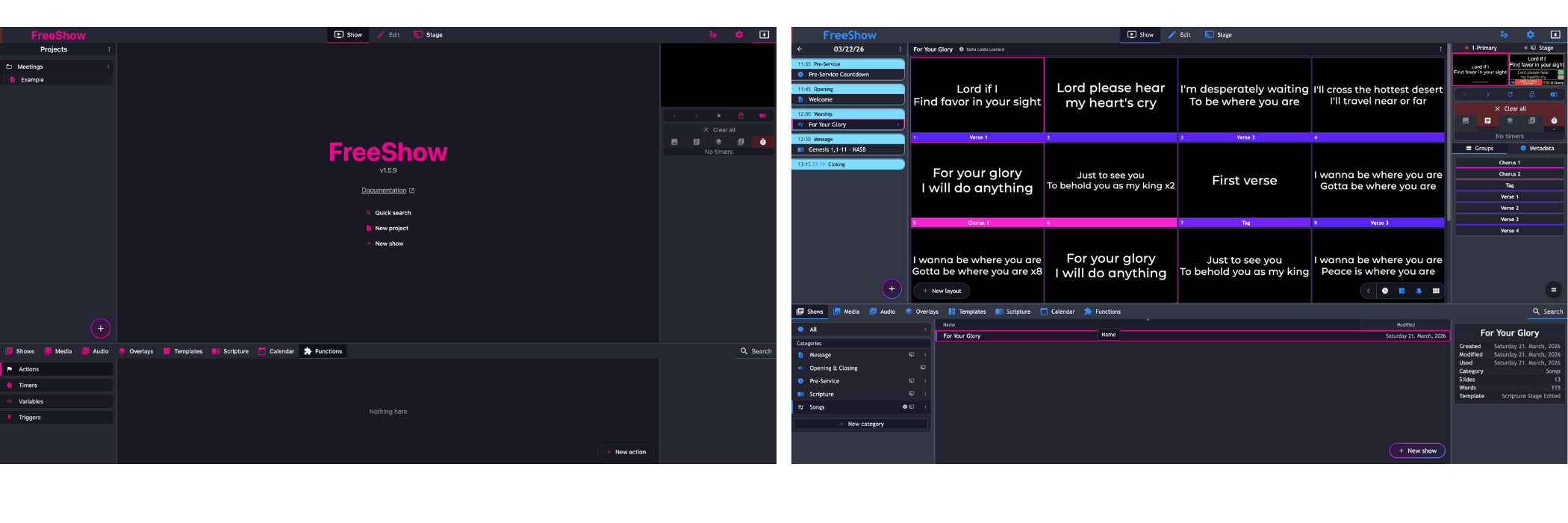
Automatically adapt your control layouts based on the type of show or presentation you are running. Whether it’s worship, scripture reading, announcements, or a message segment, the system organizes controls so your team always sees what they need.
Start your service at the right time every week with automated show launches designed to keep your service flow consistent and prepared.
Instantly communicate important information to everyone on stage and in the media booth with an integrated emergency message system. This allows leaders to share critical updates quickly without disrupting the service.
Display song credits automatically with CCLI and artist information on the first slide of each song. This helps maintain proper licensing and organization while keeping your presentation professional.
This system includes everything from the Blueprint System and Confidence System, plus advanced automation tools.
Sunday Project Blueprint
The foundational structure for organizing your Sunday service.
Sunday Project Integrated Time-Keeping
Built-in time awareness tools for media teams and ministry leaders.
8 Fully Designed Confidence Control Center Layouts
Interactive layouts designed for different service situations.
Built-in Actions to Switch Stage Layouts Automatically
Automated controls designed specifically for your stage display workflows.
Built-in Actions for Each Presentation Category
Automation tools tailored for lyrics, scripture, announcements, and message segments.
Built-in Actions for Starting Service Each Week
Automated processes that help your service launch smoothly every week.
Custom Lyric and Scripture Templates
Professionally structured templates designed to support worship and teaching moments.
Preset Song Metadata Displays
Automatically present song information before and after each song for organization and compliance.
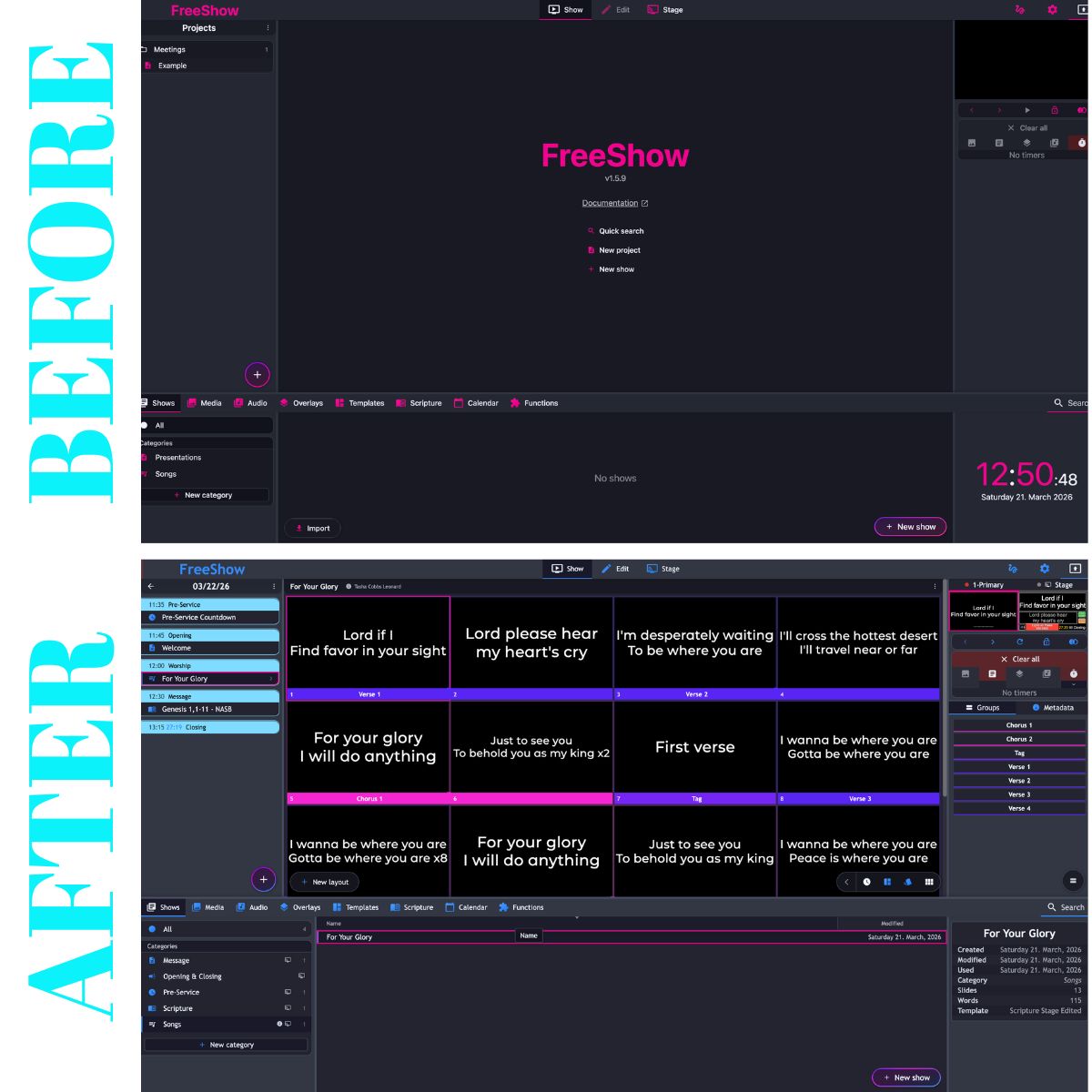
The Automation System is designed for ministries that want their media systems to operate at a higher level of organization and efficiency.
This system is ideal for:
• Advanced FreeShow media leaders looking to streamline their workflow
• Ministries transitioning from ProPresenter
• Larger churches that want consistent and repeatable systems
• Leaders who want integrated, efficient, and customized media environments
• Teams looking to save time through built-in automation
Instead of:
• rebuilding service workflows every week
• manually triggering routine tasks
• scrambling to organize slides and media
• struggling with inconsistent processes
Your ministry gains a system designed to be organized, optimized, and efficient.
Automation handles the routine details so your team can stay focused on the service.
The Automation System transforms your media booth into a fully integrated service system—one that saves time, reduces pressure, and supports your leaders with reliable structure.
When the structure is organized and automated, your ministry can focus on what matters most.
Prepare the environment.
Systemize the structure.
Stay focused on the Spirit.
As a media leader it's important to understand how the system works. What’s connected to what. So let's dive in!
In our system, everything is practically integrated for simplicity:
Dynamic Confidence Monitor Integration
The type of show you present dictates the stage layout
Dynamic Service Timing Integration
The order of service is not just a checklist of things to do, it integrates times to help keep everyone on track which is visible from the media booth and the stage layout.
Consistent Look
The look of each show is integrated with what's on screen. So if you're showing a scripture, it will always include the reference.
Naming Convention
Your show categories, your service headers, stage layouts and actions share the same name for consistency and simplicity. Making it easy for your media team to find what they need and making the day and training less stressful for you.
Before installing the Sunday Launch System make sure to:
Update to FreeShow 1.5.8 or newer
Backup everything
Export all existing shows
How to install
Download the Sunday Launch Automation
Open FreeShow
Go to Settings
Select Files on the right
Click Restore from the bottom
Find your downloaded Automation System
Select all the files inside and click “Open”
If you have a Windows PC you may need to download these additional files.